


Domingo Olmo Martin
REC

Tools for the camera department.

Three free apps, built by a cinematographer for the needs of the set. One keeps your footage safe, one checks it on arrival, one brings it back.

Bandua

Offload camera cards, verify every copy.

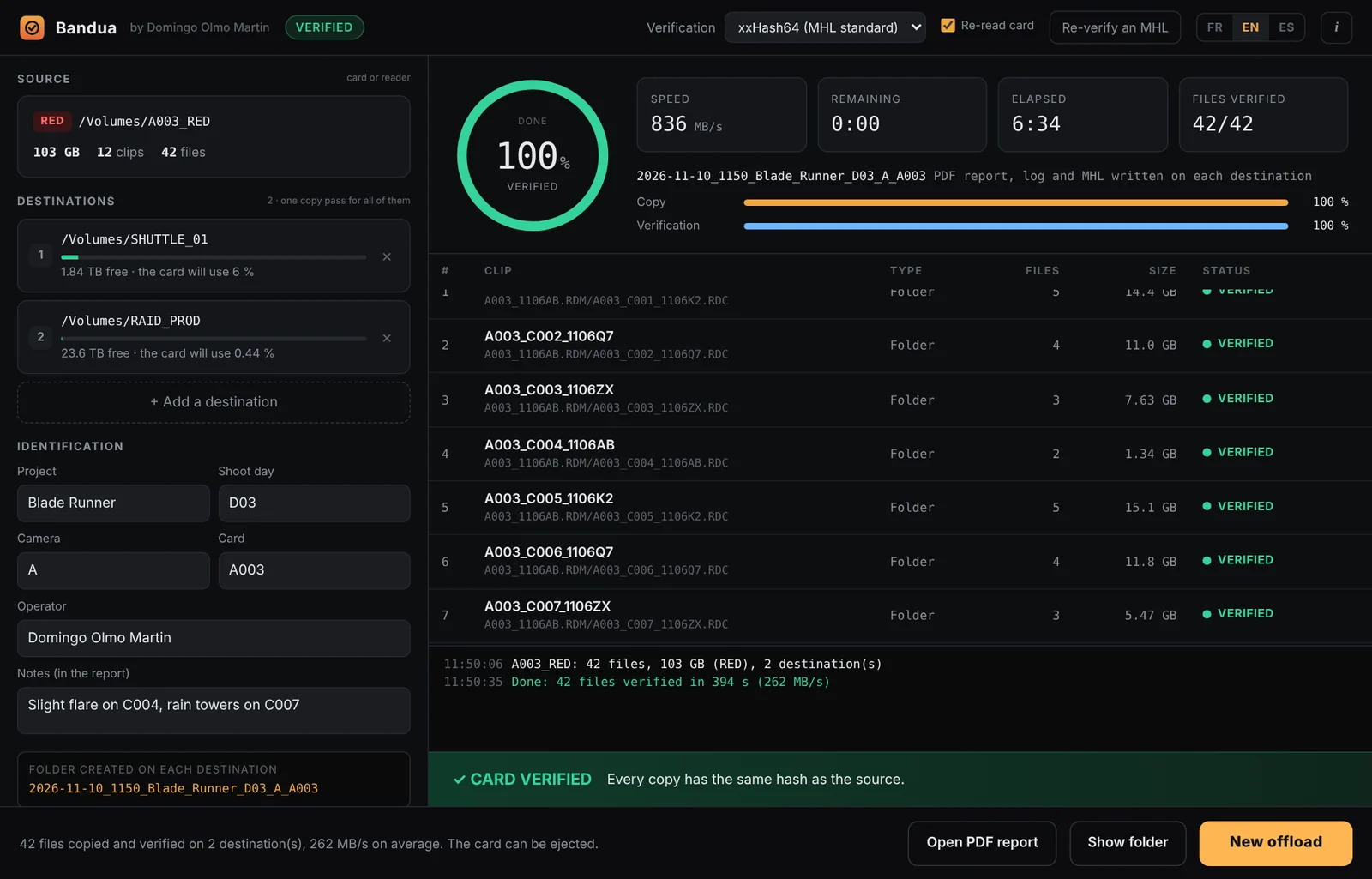
Bandua offloads camera cards to several drives at once, checks every copy against the source with a hash, and writes a log, an MHL and a PDF report for the editor or the lab. Bandua is a protective deity of the western Iberian Peninsula. Here, it watches over your footage.

Free and open source WindowsmacOS English, French, Spanish Beta 0.2
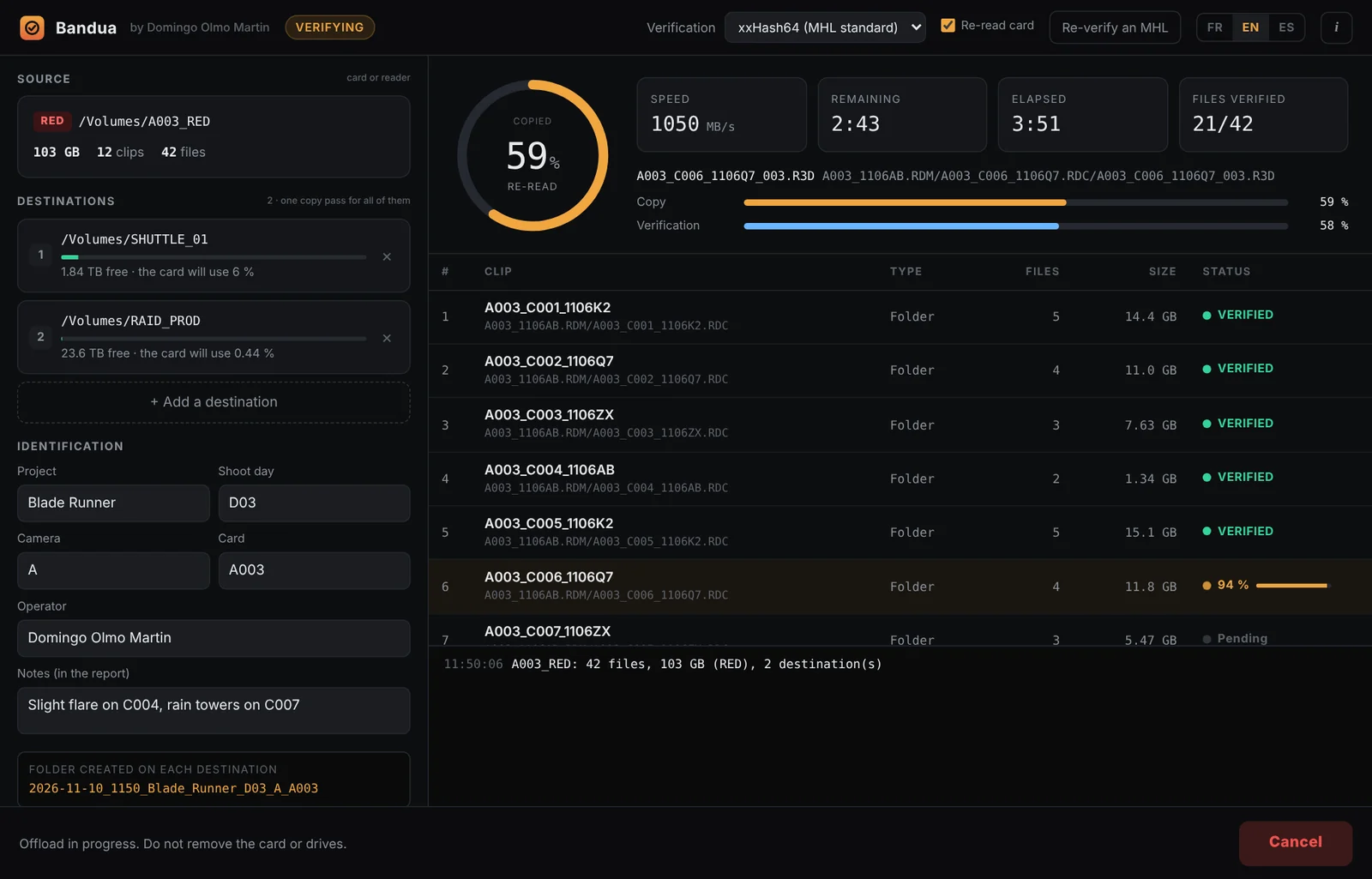
Bandua offloading a RED card to two drives
2026-11-10_1142_Blade_Runner_D03_A_A003Click to enlarge

What it does

  • Copies in a single pass to one, two or more destinations at the same time.
  • Verifies every copy on the drive itself: each copy is read back with the system cache bypassed and compared by hash (xxHash64 by default, XXH3, MD5 or SHA-1). A file only gets its final name once it is verified.
  • Reads the card a second time (on by default) to catch a faulty card reader, cable or card.
  • Watches the card during the offload: a file that changes, appears or disappears fails the offload, so you never format a card that was still being written to.
  • Copies the card exactly as it is: RED, ARRI, Blackmagic, Sony, Canon, GoPro, DJI, without system junk files. RED .RDC folders are listed as one clip each.
  • Writes 4 reports in each dated folder: PDF, text log, MHL (readable by Silverstack, ShotPut, Hedge) and JSON.
  • Re-verifies an existing folder from its MHL, before you format a card or deliver a drive, with progress, a status for each clip (verified, damaged, missing) and its own PDF report.
  • Checks free space before starting, and keeps destinations and project info so you can chain cards.

How to use it

  1. Click Source and select the card.
  2. Add one or more destinations.
  3. Fill in the project, shoot day, camera and card. The card number comes from the clip names.
  4. Click Start offload.
  5. Wait for CARD VERIFIED before you format the card.

Each destination gets a dated folder, such as 2026-11-06_1633_PROJECT_D03_A_A003.

Read the full user guide

Download Bandua

Ready to run. No Rust, no command line. The app is not signed yet, so your system warns you once on first launch: on Windows click “More info” then “Run anyway”, on macOS right-click the app and choose “Open”.

Get the latest release
Windows, no installBandua_x.y.z_portable.exe
Windows, installer_x64-setup.exe / .msi
macOS, Intel and Apple Silicon_universal.dmg

Bandua helps you copy and verify media but does not replace your own checks. Never format a card before checking that every copy is complete and readable.

MHL Companion

Received the footage? Check that nothing broke on the way.

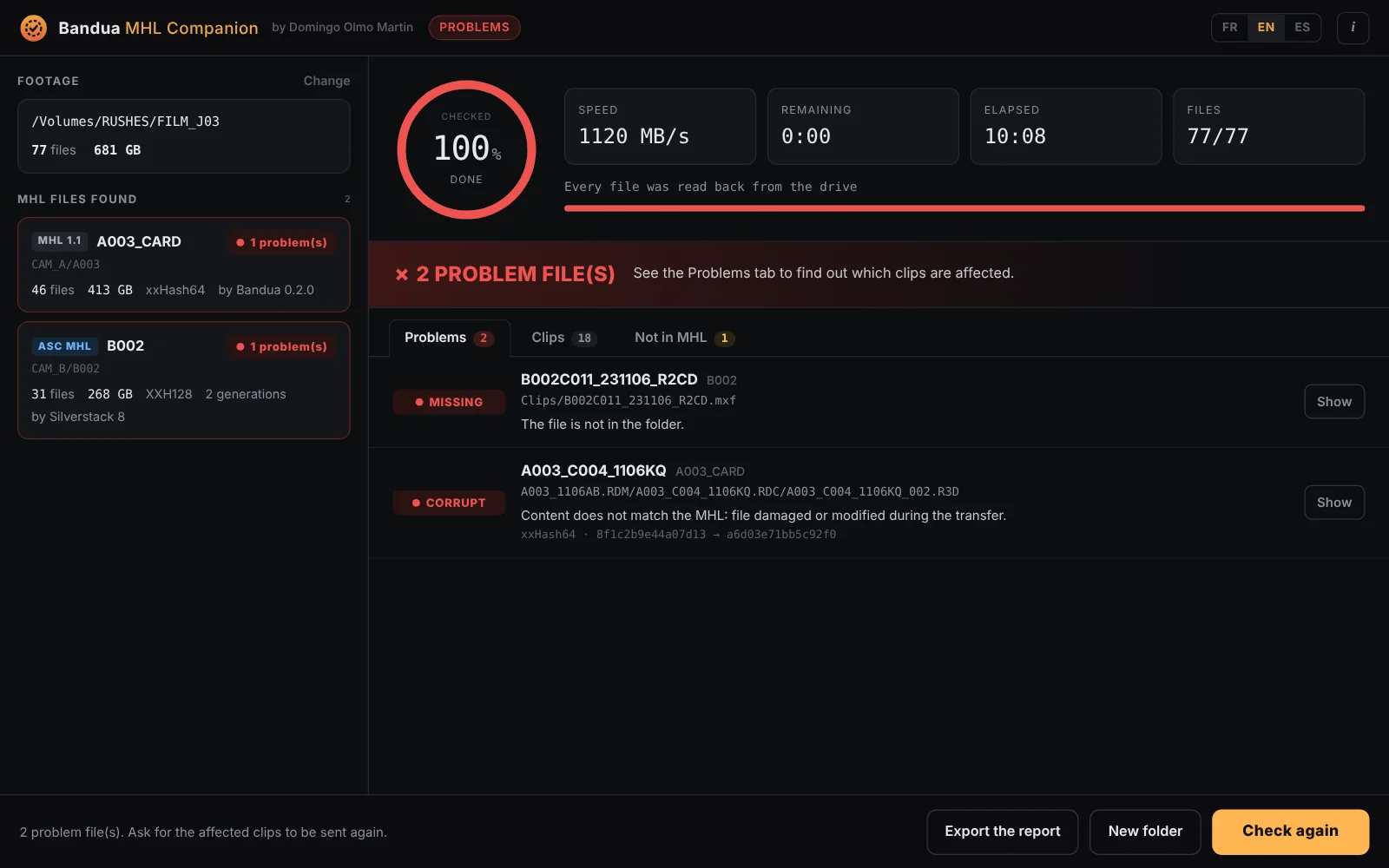
Bandua MHL Companion is for the people who receive the footage: editor, assistant editor, lab, post-production, director. Drop the folder, start the check, and it reads every file back, compares it to the MHL that came with it, and tells you clip by clip what is intact and what is corrupt, missing or incomplete. It is the companion of Bandua: Bandua writes the MHL on set, the Companion checks it at the other end. It also reads the MHL files written by Silverstack, ShotPut Pro, Hedge and others.

Free and open source WindowsmacOS English, French, Spanish Beta 0.1
Bandua MHL Companion after a check, one corrupt clip and one missing clip
FILM_J03 / CAM_A / A003 · CAM_B / B002Click to enlarge

What it does

  • Finds every MHL in the folder you drop: several shoot days, cameras and cards at once, or a single .mhl file.
  • Reads MHL 1.1 and ASC MHL: Bandua, Silverstack, ShotPut Pro, Hedge, YoYotta… ASC MHL histories are merged across generations, and a history modified after the fact is flagged.
  • Reads every file back from the drive with the system cache bypassed, and compares its hash (xxHash64, XXH3, XXH128, MD5, SHA-1, SHA-256, C4…).
  • Names the problem clips: corrupt, missing, incomplete or unreadable, with the clip name (RED .RDC folders, ARRI, BRAW…) and a button to show the file.
  • Lists the files no MHL covers, so you know what could not be checked.
  • Exports a text report to send back to the production or the DIT. A command line tool is included for scripts.
  • Read only: nothing is ever changed or added next to the footage.

How to use it

  1. Drop the footage folder onto the window, or choose it.
  2. Check the list of MHL files found.
  3. Click Start the check.
  4. Wait for FOOTAGE INTACT, or open the Problems tab to see which clips to ask for again.
  5. Export the report if you need to send it.

A check only means something if the MHL comes from the person who made the original copy, ideally sent separately from the footage.

Read the full user guide

Download Bandua MHL Companion

Ready to run. No Rust, no command line. The app is not signed yet, so your system warns you once on first launch: on Windows click “More info” then “Run anyway”, on macOS right-click the app and choose “Open”.

Get the latest release
Windows, no installBandua_MHL_Companion_x.y.z_portable.exe
Windows, installer_x64-setup.exe / .msi
macOS, Intel and Apple Silicon_universal.dmg

Bandua MHL Companion helps you check media but does not replace your own checks and backups. Keep the original drive until the check is done.

Ataecina

Recover lost footage, repair broken clips.

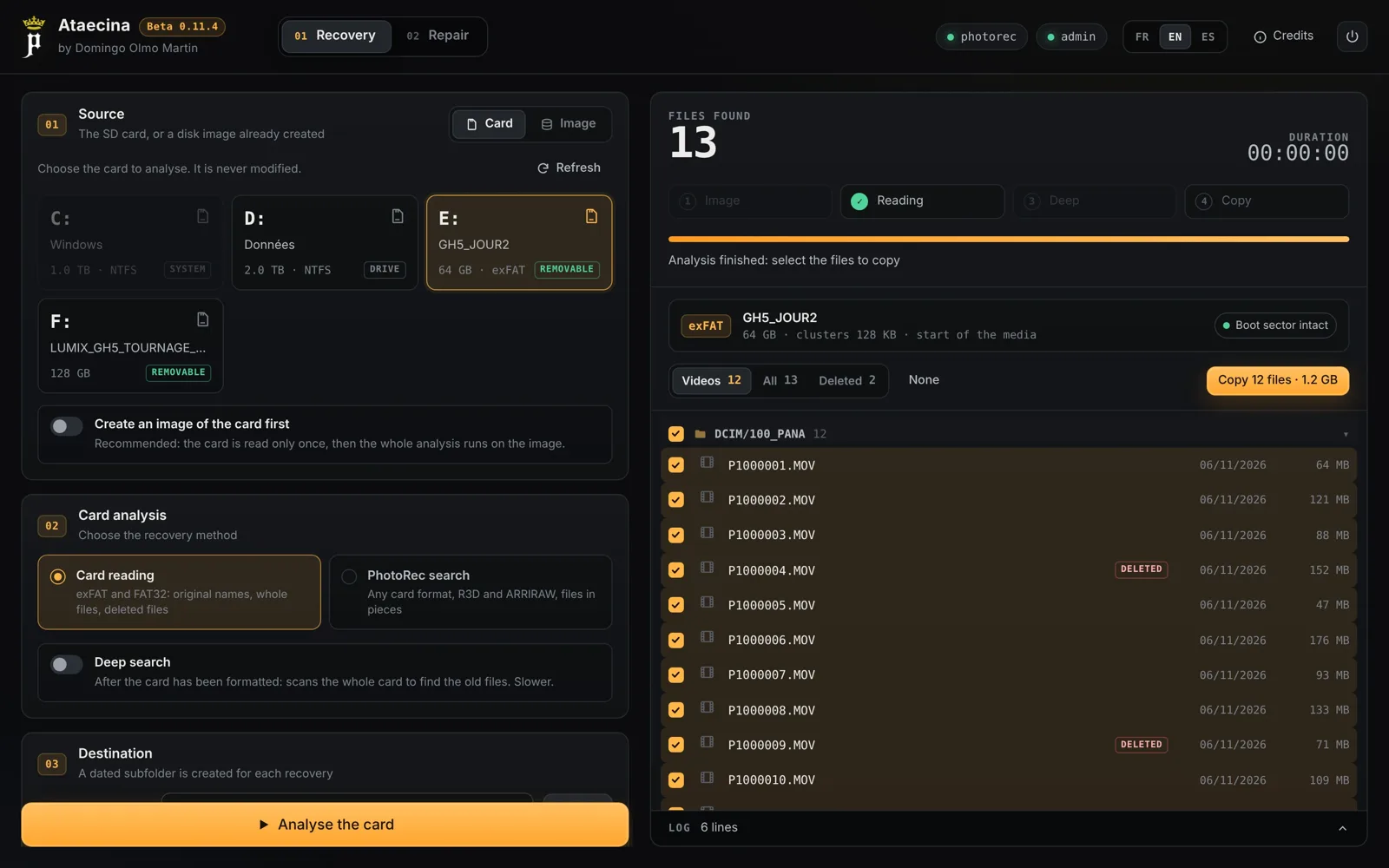
Ataecina reads camera cards, finds deleted files and files from a card formatted by mistake, restores a damaged card format, and repairs broken MOV and MP4 clips with a healthy reference clip. Ataecina is a goddess of the ancient Iberian Peninsula, often read as “the Reborn”. Like her, it brings back to light images we thought were lost.

Free and open source Windows English, French, Spanish Beta 0.11
Ataecina after reading a card, deleted clips found
GH5_JOUR2 / DCIM / 100_PANAClick to enlarge

Recovery

  • Card reading (exFAT, FAT32): original names and folders, deleted files, deep search after a format, boot sector restored from its backup copy.
  • PhotoRec search for every card format: MOV, MP4, BRAW, R3D, ARRIRAW, MXF, even files in pieces.
  • Card image first, the GNU ddrescue way: healthy areas first, damaged areas last, resume after an interruption.

Repair

  • Batch repair with untrunc and one or more reference clips, normal mode then step mode.
  • Checks with ffprobe, and a full decode with ffmpeg if you ask. Thumbnails and a journal.csv.
  • Original files are never modified.

Ataecina drives free tools you install from their official sites: untrunc, FFmpeg and TestDisk / PhotoRec.

User guide and tool setup

Download Ataecina

For Windows. The app is not signed yet: Windows warns you once, click “More info” then “Run anyway”. Reading a card directly needs administrator rights, and Ataecina offers to restart itself as administrator when needed.

Get the latest release
Windows, no installAtaecina_x.y.z_portable.exe
Windows, installer_x64-setup.exe / .msi

Put untrunc, FFmpeg and PhotoRec next to Ataecina.exe, in a tools folder, or in your PATH. You can also set their location in the app.

Domingo Olmo Martin

Director of photography, screenwriter, director

I work behind the camera on fiction films and commercial productions. Born in Barcelona, I live and work in France, and I shoot mostly on Blackmagic, RED and ARRI cameras.

I also write code. Bandua, Bandua MHL Companion and Ataecina started as tools I needed on my own shoots: one to offload cards without a doubt in mind, one so the editor can check the footage that reaches them, one for the day a card goes wrong. They are free because every camera department, and everyone after it, should have them.

Found a bug, or have an idea? Open an issue on the project page. Feedback from the set is what makes them better.